
Gaming Desk Customizations for Gamers
Gaming Desk Customizations for Gamers
Feb 12, 2026
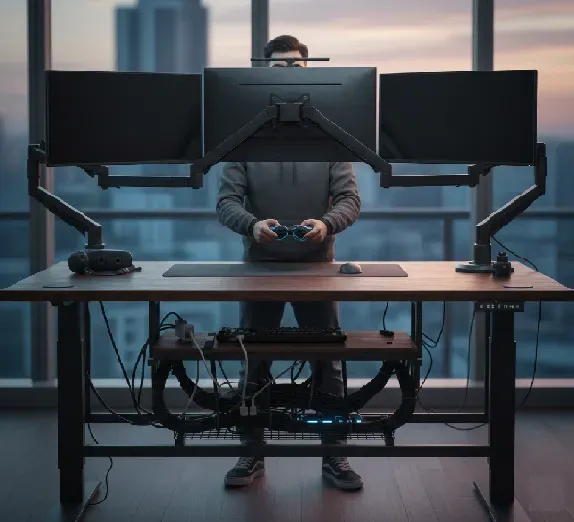
Gaming involves long hours at desks, which can lead to back pain, wrist strain, and poor posture if setups are not ergonomic. Customizing desks for gamers helps in creating a comfortable space for multi-screen gaming, controller use, and organized cables. This guide explores key customizations like monitor arms, wrist supports, and cable management to boost comfort and performance.
Why Ergonomics Matters for Gamers
Gamers often sit or stand for 4-8 hours daily, staring at screens and gripping controllers. Poor setups strain the neck, shoulders, and wrists, raising risks of repetitive strain injury (RSI) or carpal tunnel. Ergonomic tweaks reduce fatigue, improve focus, and prevent health issues. A customized desk keeps eyes level with screens, wrists neutral, and movements fluid.
Monitor Arms for Multi-Screen Gaming
Multi-monitor setups are common for immersive gaming, streaming, or multitasking. Standard desk mounts limit adjustability, causing neck craning.
- Use dual or triple monitor arms like fully adjustable ones. These monitor arms clamp to desks, freeing up space.
- Key features: Gas-lift mechanisms for smooth height, tilt, swivel, and rotation up to 180 degrees. VESA-compatible for 17-32 inch screens.
- Benefits: Position screens at eye level (top at or below eye height) and 20-30 inches away. This cuts eye strain and aligns posture.
- Pro tip: For gamers, choose arms with quick-release for easy swapping during LAN parties.
Height-adjustable standing desks pair perfectly, letting you alternate sitting and standing without disturbing screens.
Wrist Support for Controllers
Controller gaming (Xbox, PlayStation) demands steady hands but often leads to wrist fatigue from elevated grips.
- Opt for gel-filled wrist rests or padded controller trays. These keep wrists straight, avoiding bends over 20 degrees.
- Split designs cradle controllers naturally, with slight elevation (1-2 inches) matching hand height.
- Memory foam options mold to your grip, reducing pressure points during marathon sessions like RPGs or fighters.
- For keyboard/mouse hybrids, add adjustable trays that slide out, positioning peripherals at elbow height.
Regular micro-breaks (20-20-20 rule: every 20 minutes, look 20 feet away for 20 seconds) enhance these supports.
Cable Management Solutions
Messy cables under desks trip feet, snag gear, and look unprofessional for streamers.
- Install under-desk trays or channels with clips. Velcro straps bundle HDMI, power, and USB cables neatly.
- Grommet holes in desks route cables down, paired with magnetic organizers for quick access.
- Lift-up cable baskets hide excess length while allowing airflow to prevent overheating.
- Wireless peripherals minimize wires, but for wired setups, use powered USB hubs mounted on arms.
Clean routing keeps desks tidy, speeds gear swaps, and supports standing transitions.
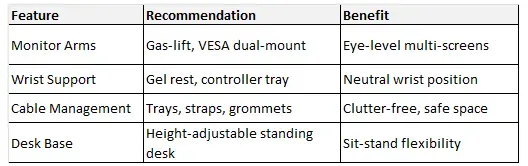
Quick Customization Checklist
Final Tips
Start with measurements: Desk height at elbow level when seated (28-30 inches), screens arm's length away. Test setups for 30 minutes. Invest gradually—monitor arms first for biggest impact. These changes turn gaming desks into ergonomic powerhouses, letting you play longer without pain. Pair with stretches and hydration for peak performance.